
Setting Photon Monte Carlo Solver Parameters
The Surface Photon Monte Carlo (SPMC) model uses a statistical solver to model photon transport.
- Select the node and set Rays Per Patch to 25.
The SPMC model allows for aggregating the statistics over iterations via the use of a statistical sampling factor. This ensures that you do not have to use a large number of rays in the SPMC computations, and the statistics for the radiative quantities of interest can be aggregated over several iterations. At a value of 1, the aggregated solution is set to the latest SPMC ray tracing solution. For a value of 0.5, the aggregated solution is updated by taking half of the latest solution and half of the previous aggregated solution. A value of 0 means that the aggregated solution stays unchanged.
You are advised to use a high sampling factor at the start of the simulation, since that leads to a fast feedback of radiative solutions into the energy equation and, consequently, a fast evolution of the temperature field.
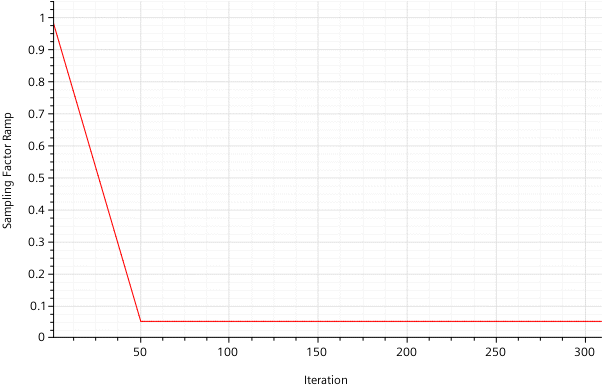
For this tutorial, you set up a linear ramp that starts with a sampling factor of 1.0, reduces to a value of 0.05 during the first 50 iterations, and then remains constant until the simulation completes:
-
Set up the ramp:
-
To visualize the sampling factor ramp during the run, you monitor the created
report and add it to the pre-defined temperature plot:
- Right-click the node and select Create Monitor from Report.
- Right-click the node and select Add Data.
- In the Add Data Providers to Plot dialog, select Sampling Factor Ramp Monitor and click OK.
- Select the node and set Y-Axis to Right Axis.
- Select the node and set Iteration Update Frequency to 5.
-
Save the simulation
 .
.