
Orienting Boundary Normals
Correct orientation of boundary normals is essential for accurate SPH simulations, as it directly influences the boundary-normal solution quantities.
To orient boundary face normals:
-
Click
 (Initialize Solution).
-
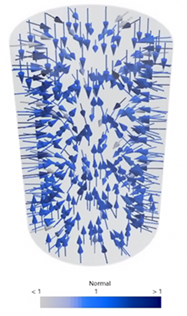
Create a vector scene to visualize the face normals.
- Select the node and set Parts to the boundaries for which you want to assess the orientation of the normals.
- Select the node and set Function to Normal.
- Examine the normals.
-
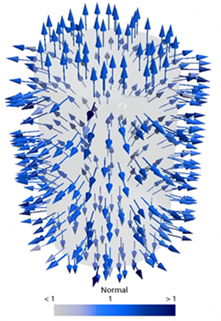
Select the node and activate Reverse
Orientation.
See Part Orientation.
You can reverse the orientation of individual boundaries in
the same surface region by using per-part for the subgroup that contains the parts
of interest.
-
If you want to reverse the orientation for an individual boundary do the
following:
| Normals Before Reversing the Orientation (Default) | Normals After Reversing the Orientation |
|---|---|
 |
 |