
Fluent Meshing的流程操作过程可以录制成脚本文件,方便重复利用及参数化处理。
脚本录制过程非常简单:
-
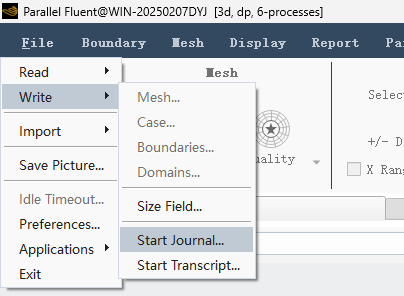
• 选择菜单 File → Write → Start Jounral...
-
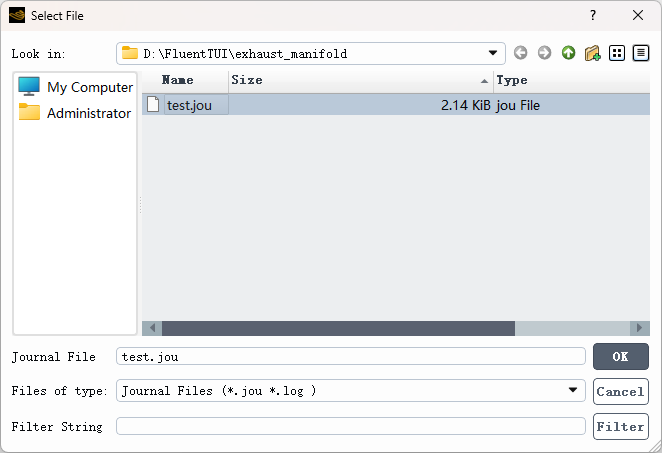
• 在打开的文件选择对话框中指定脚本文件的名称
-
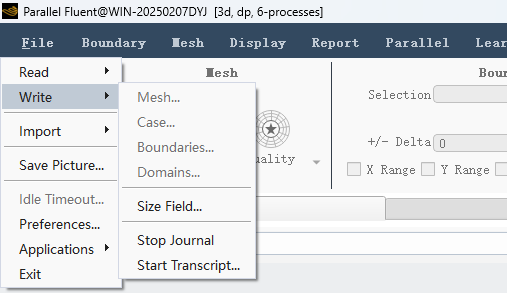
• 后续在Fluent Meshing中正常操作,当操作完毕后,可以点击菜单 File → Write → Stop Journal完成脚本录制
此时之前所有的软件操作操作都会以脚本的形式保存在文件中,如下所示(其中文件存储/file/write-mesh "manifold.msh.gz"及/exit为手工添加)
/file/set-tui-version "25.2"
(%py-exec"workflow.InitializeWorkflow(WorkflowType=r'Watertight Geometry')")
(%py-exec"workflow.TaskObject['Import Geometry'].Arguments.set_state({r'FileName': r'D:/FluentTUI/exhaust_manifold/manifold.dsco.pmdb',r'LengthUnit': r'mm',})")
(%py-exec"workflow.TaskObject['Import Geometry'].Execute()")
(newline)
(%py-exec"workflow.TaskObject['Add Local Sizing'].AddChildAndUpdate(DeferUpdate=False)")
(%py-exec"workflow.TaskObject['Generate the Surface Mesh'].Arguments.set_state({r'CFDSurfaceMeshControls': {r'MaxSize': 6,r'MinSize': 1,},})")
(%py-exec"workflow.TaskObject['Generate the Surface Mesh'].Execute()")
(%py-exec"workflow.TaskObject['Describe Geometry'].Arguments.set_state({r'NonConformal': r'No',})")
(%py-exec"workflow.TaskObject['Describe Geometry'].Execute()")
(%py-exec"workflow.TaskObject['Enclose Fluid Regions (Capping)'].Arguments.set_state({r'LabelSelectionList': [r'in1', r'in2', r'in3'],r'PatchName': r'inlet',r'PatchType': r'Single Surface',r'SelectionType': r'label',r'ZoneType': r'velocity-inlet',})")
(%py-exec"workflow.TaskObject['Enclose Fluid Regions (Capping)'].AddChildAndUpdate(DeferUpdate=False)")
(%py-exec"workflow.TaskObject['Enclose Fluid Regions (Capping)'].Arguments.set_state({r'LabelSelectionList': [r'out1'],r'PatchName': r'outlet',r'PatchType': r'Single Surface',r'SelectionType': r'label',r'ZoneType': r'pressure-outlet',})")
(%py-exec"workflow.TaskObject['Enclose Fluid Regions (Capping)'].AddChildAndUpdate(DeferUpdate=False)")
(%py-exec"workflow.TaskObject['Create Regions'].Execute()")
(%py-exec"workflow.TaskObject['Update Regions'].Execute()")
(%py-exec"workflow.TaskObject['Add Boundary Layers'].Arguments.set_state({r'LocalPrismPreferences': {r'Continuous': r'Continuous',},})")
(%py-exec"workflow.TaskObject['Add Boundary Layers'].AddChildAndUpdate(DeferUpdate=False)")
(%py-exec"workflow.TaskObject['Generate the Volume Mesh'].Arguments.set_state({r'VolumeFill': r'polyhedra',r'VolumeFillControls': {r'GrowthRate': 1.2,r'TetPolyMaxCellLength': 8,},})")
(%py-exec"workflow.TaskObject['Generate the Volume Mesh'].Execute()")
/file/write-mesh "manifold.msh.gz"
/exit可以将上面的脚本转换成pyFluent代码。
import ansys.fluent.core as pyfluent
mesh = pyfluent.launch_fluent(mode = "meshing",precision="double",processor_count=2)

mesh.workflow.InitializeWorkflow(WorkflowType=r'Watertight Geometry')
mesh.workflow.TaskObject['Import Geometry'].Arguments.set_state({r'FileName': r'D:/FluentTUI/exhaust_manifold/manifold.dsco.pmdb',r'LengthUnit': r'mm',})
mesh.workflow.TaskObject['Import Geometry'].Execute()

mesh.workflow.TaskObject['Add Local Sizing'].AddChildAndUpdate(DeferUpdate=False)
mesh.workflow.TaskObject['Generate the Surface Mesh'].Arguments.set_state({r'CFDSurfaceMeshControls': {r'MaxSize': 6,r'MinSize': 1,},})
mesh.workflow.TaskObject['Generate the Surface Mesh'].Execute()
mesh.workflow.TaskObject['Describe Geometry'].Arguments.set_state({r'NonConformal': r'No',})
mesh.workflow.TaskObject['Describe Geometry'].Execute()
mesh.workflow.TaskObject['Enclose Fluid Regions (Capping)'].Arguments.set_state({r'LabelSelectionList': [r'in1', r'in2', r'in3'],r'PatchName': r'inlet',r'PatchType': r'Single Surface',r'SelectionType': r'label',r'ZoneType': r'velocity-inlet',})
mesh.workflow.TaskObject['Enclose Fluid Regions (Capping)'].AddChildAndUpdate(DeferUpdate=False)
mesh.workflow.TaskObject['Enclose Fluid Regions (Capping)'].Arguments.set_state({r'LabelSelectionList': [r'out1'],r'PatchName': r'outlet',r'PatchType': r'Single Surface',r'SelectionType': r'label',r'ZoneType': r'pressure-outlet',})
mesh.workflow.TaskObject['Enclose Fluid Regions (Capping)'].AddChildAndUpdate(DeferUpdate=False)
mesh.workflow.TaskObject['Create Regions'].Execute()
mesh.workflow.TaskObject['Update Regions'].Execute()
mesh.workflow.TaskObject['Add Boundary Layers'].Arguments.set_state({r'LocalPrismPreferences': {r'Continuous': r'Continuous',},})
mesh.workflow.TaskObject['Add Boundary Layers'].AddChildAndUpdate(DeferUpdate=False)
mesh.workflow.TaskObject['Generate the Volume Mesh'].Arguments.set_state({r'VolumeFill': r'polyhedra',r'VolumeFillControls': {r'GrowthRate': 1.2,r'TetPolyMaxCellLength': 8,},})
mesh.workflow.TaskObject['Generate the Volume Mesh'].Execute()
mesh.meshing.File.WriteMesh(r'manifold.msh')
mesh.exit()
也可以写个转换程序快速完成。
"""
处理text.jou文件的Python程序process.py
"""

import re

defprocess_jou_file(input_file, output_file):
    """
    处理.jou文件,根据指定规则修改内容
    """
    withopen(input_file, 'r', encoding='utf-8') as f:
        lines = f.readlines()

    processed_lines = []

    for line in lines:
        # 跳过以/file/set-tui-version开始的行
        if line.startswith('/file/set-tui-version'):
            continue

        # 删除字符串:(newline)
        line = line.replace('(newline)', '')

        # 处理以/file/write-mesh开始的行
        if line.startswith('/file/write-mesh'):
            # 提取引号中的内容
            match = re.search(r'"([^"]+)"', line)
            ifmatch:
                filename = match.group(1)
                # 移除.gz扩展名并添加.msh扩展名
                if filename.endswith('.gz'):
                    filename = filename[:-3]  # 移除.gz
                # 替换整行
                line = f'mesh.meshing.File.WriteMesh(r'{filename}')n'

        # 将字符串/exit替换成mesh.exit()
        if line.strip() == '/exit':
            line = 'mesh.exit()n'

        # 去除每行末尾的字符串")
        if line.endswith('")n'):  # 处理以换行符结尾的行
            line = line[:-3] + 'n'# 去除最后3个字符(")n),保留换行符
        elif line.endswith('")'):   # 处理不以换行符结尾的行
            line = line[:-2]  # 去除最后2个字符(")

        # 将(%py-exec "替换为mesh.
        line = line.replace('(%py-exec "', 'mesh.')

        processed_lines.append(line)

    # 在文件头部添加指定的两行文本
    header_lines = [
        'import ansys.fluent.core as pyfluentn',
        'mesh = pyfluent.launch_fluent(mode = "meshing",precision="double",processor_count=2)n',
        'n'# 添加一个空行以分隔头部和主体内容
    ]

    # 将处理后的内容写入输出文件
    withopen(output_file, 'w', encoding='utf-8') as f:
        f.writelines(header_lines)  # 先写入头部
        f.writelines(processed_lines)  # 再写入处理后的内容


defmain():
    input_file = 'text.jou'
    output_file = 'processed_text.jou'

    process_jou_file(input_file, output_file)
    print(f"文件 {input_file} 已处理完成,结果保存在 {output_file}")


if __name__ == "__main__":
    main()
(完)

本篇文章来源于微信公众号: CFD之道







评论前必须登录!
注册