
OpenFOAM可以使用foamMonitor程序进行图形绘制,其中用得最多的是用于残差监测。foamMonitor内部利用gnuplot来对数据文件进行图形绘制。不过默认的显示样式的确不敢恭维,如下图所示,图例和曲线叠到一起,而且x坐标太挤了。
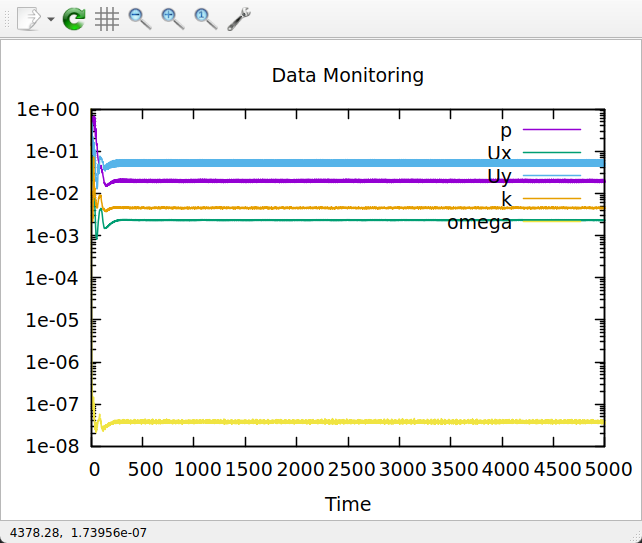
可以利用命令which foamMonitor找到系统中安装的foamMonitor,如下图所示,该脚本文件位于/opt/openfoam13/bin/foamMonitor。

利用文本编辑器打开文件foamMonitor,修改文件中的gnuplotSetup函数中的内容,如下所示。
gnuplotSetup() {
    _ticFormat="%g"
    [ "$logscale" = yes ] && _ticFormat="%1.e"
    _otherAxis="$([ "$AXIS" = x ] && echo y || echo x)"

    # Calculate number of variables to display
    num_vars=$(echo "$columns" | wc -w)

    # Calculate dynamic width based on number of variables
    # Base width: 640, additional width per variable: 80
    # Minimum width: 640, Maximum width: 1600
    base_width=640
    width_per_var=80
    calculated_width=$((base_width + (num_vars - 1) * width_per_var))

    # Apply limits
    [ "$calculated_width" -lt 640 ] && calculated_width=640
    [ "$calculated_width" -gt 1600 ] && calculated_width=1600

    # Use calculated width if size is default, otherwise use user-specified size
    if [ "$size" = default ]; then
        dynamic_size="$calculated_width,480"
    else
        dynamic_size="$size"
    fi

    printf "set term %s" "$term"
    printf " size %s" "$dynamic_size"
    printf "n"

    [ "$logscale" = yes ] && printf "set logscale %sn" "$AXIS"
    [ "$range" = none ] || printf "set %srange %sn" "$AXIS" "$range"
    printf "set %stics format "%s"n" "$AXIS" "$_ticFormat"
    printf "set title "%s"n" "$title"
    printf "set %slabel "%s"n" "$_otherAxis" "$label"
    printf "set key outside bottom center horizontaln"
    printf "set key spacing 0.6n"
    printf "set key samplen 2.5n"
    printf "set key width 2n"
    printf "set key maxrows 1n"
    printf "set bmargin 5n"

    # Enhanced aesthetics settings
    printf "set grid xtics yticsn"
    printf "set grid linewidth 0.5 linetype 0 linecolor rgb "#cccccc"n"
    printf "set border linewidth 1.5n"
    printf "set tics scale 0.75n"

    # Define beautiful color palette
    printf "set linetype 1 linecolor rgb "#1f77b4" linewidth 1.5n"  # Blue
    printf "set linetype 2 linecolor rgb "#ff7f0e" linewidth 1.5n"  # Orange
    printf "set linetype 3 linecolor rgb "#2ca02c" linewidth 1.5n"  # Green
    printf "set linetype 4 linecolor rgb "#d62728" linewidth 1.5n"  # Red
    printf "set linetype 5 linecolor rgb "#9467bd" linewidth 1.5n"  # Purple
    printf "set linetype 6 linecolor rgb "#8c564b" linewidth 1.5n"  # Brown
    printf "set linetype 7 linecolor rgb "#e377c2" linewidth 1.5n"  # Pink
    printf "set linetype 8 linecolor rgb "#7f7f7f" linewidth 1.5n"  # Gray
    printf "set linetype 9 linecolor rgb "#bcbd22" linewidth 1.5n"  # Olive
    printf "set linetype 10 linecolor rgb "#17becf" linewidth 1.5n" # Cyan
}
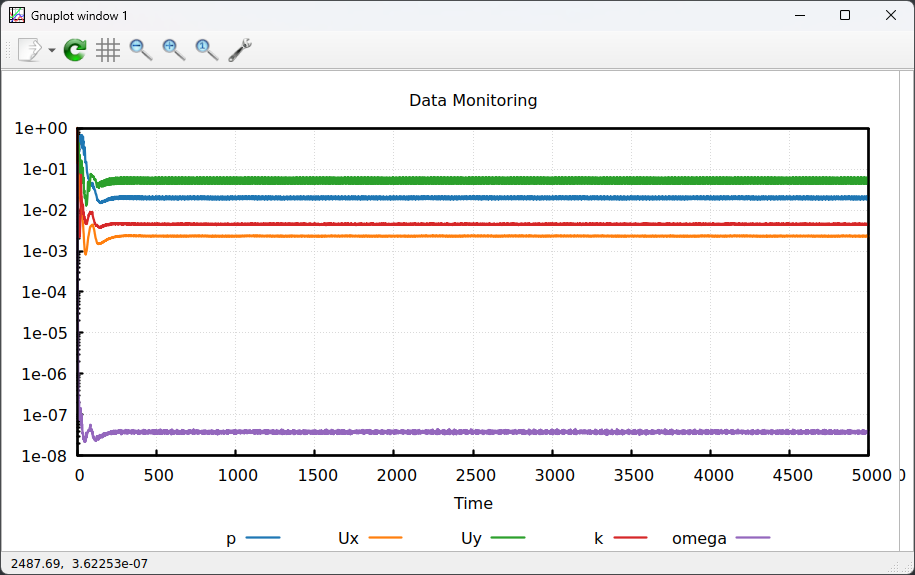
此时运行foamMonitor后显示的界面如下图所示,整体显示效果有了改善。
(完)

本篇文章来源于微信公众号: CFD之道







评论前必须登录!
注册